
Can I use Spoak to create a custom realistic background for my design?
Yes! You can create a completely custom room background right inside your Vizi, no photo needed!
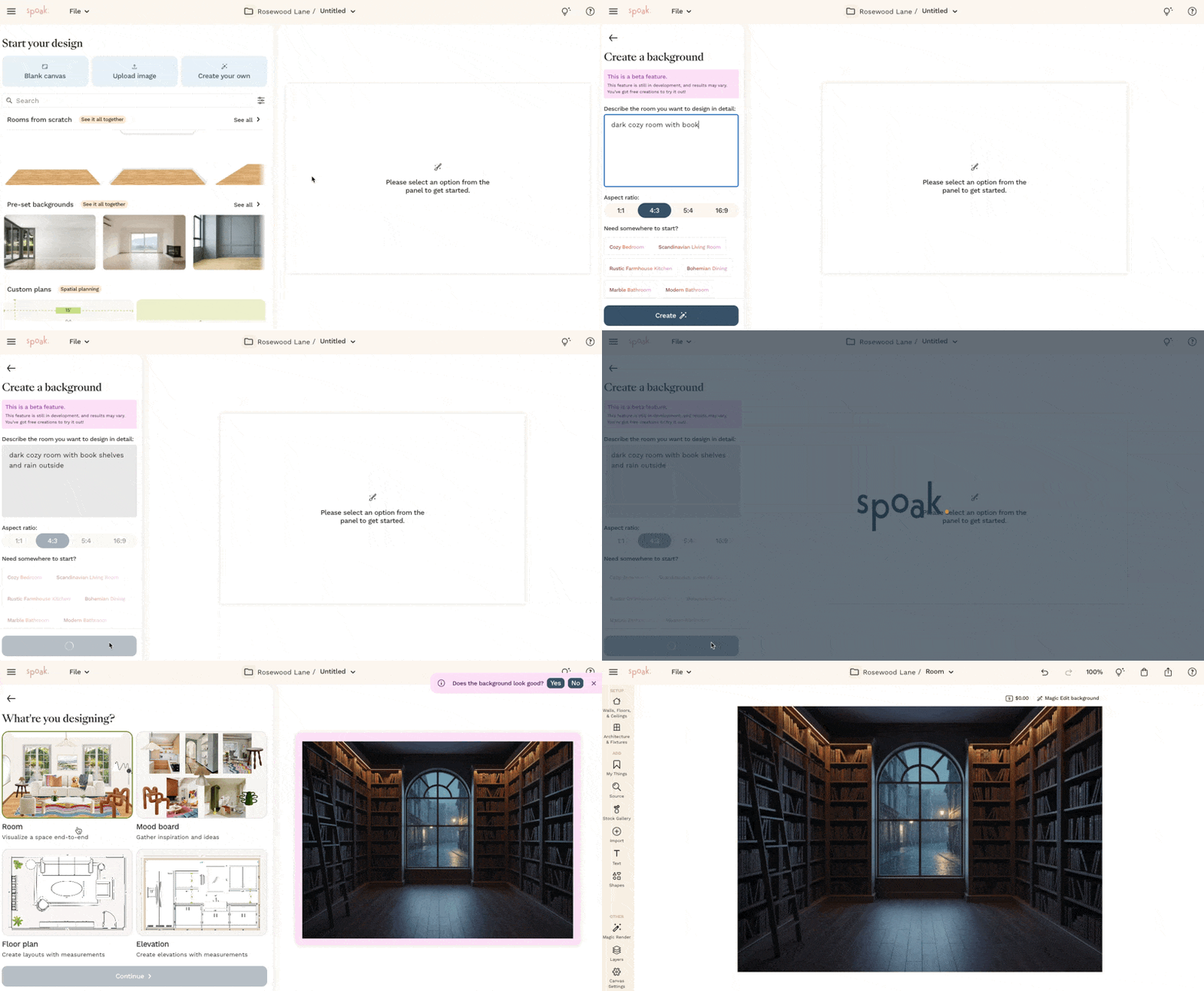
Use Spoak's ✨Magic Background Create✨ to instantly conjure a realistic room scene to design in, all from a simple text description.
- Open or create a new Vizi
- In the left-hand panel, click Create your own
- Describe the room you want — think style, lighting, materials, or vibe (e.g. "dark cozy room with book shelves and rain outside") or choose from the example prompts if you're not sure where to start!
- Click Create🪄 and let the magic happen!
- Start adding furniture, décor, and finishes to your new space!
🔥 Hot tips!
- The more descriptive your prompt, the better your results! Try including the room type, color palette, natural light preferences, and any specific materials or styles you love.
- Not feeling the result? Use Magic Background Edit to further customize!